Webhook Integration
1. Introduction
The CDR Manager Webhook integration is a feature that allows the CDR task reports to be delivered by setting up a webhook. When a webhook is set up, as soon as a CDR task is completed and a report is exported, the webhook sends a request to the webhook URL with a payload containing a link to retrieve the report.
The advantage of a webhook is that it sends data in real time, whenever the relevant event happens.
The feature will run immediately upon being notified by the CDR Manager app that the report is available. System sends an HTTP request with a payload to the webhook URL.
2. Webhook Configuration
This feature can be enabled while defining a new CDR task in the Platform CDR Manager section. After setting up all filters' details for the CDR task, the Webhook option can be selected for report delivery.
After the Webhook option is selected, additional fields will be shown for selecting the previously set webhook configuration or for adding a new one.
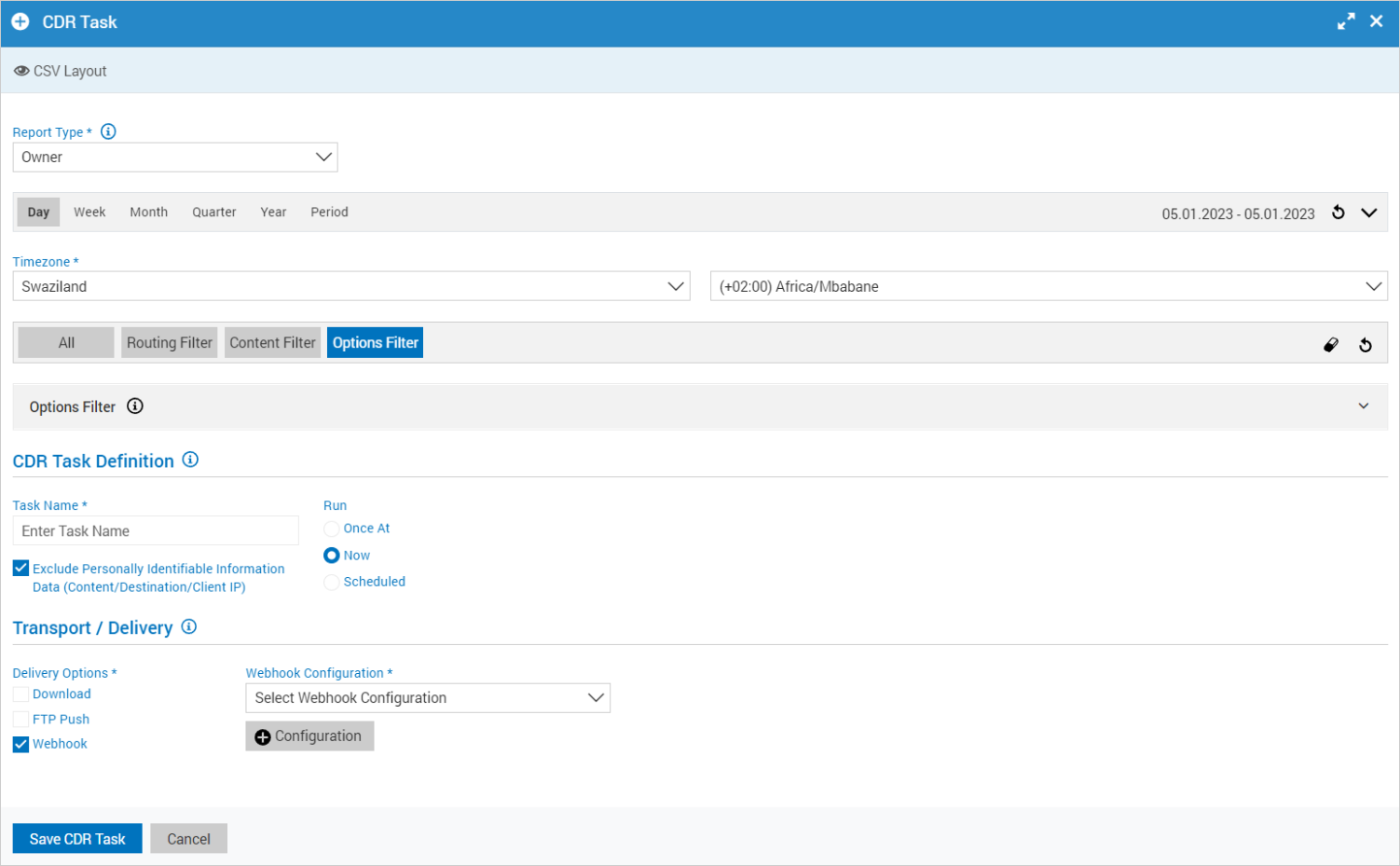
After selecting the option to add a new webhook configuration, a new window will be opened.
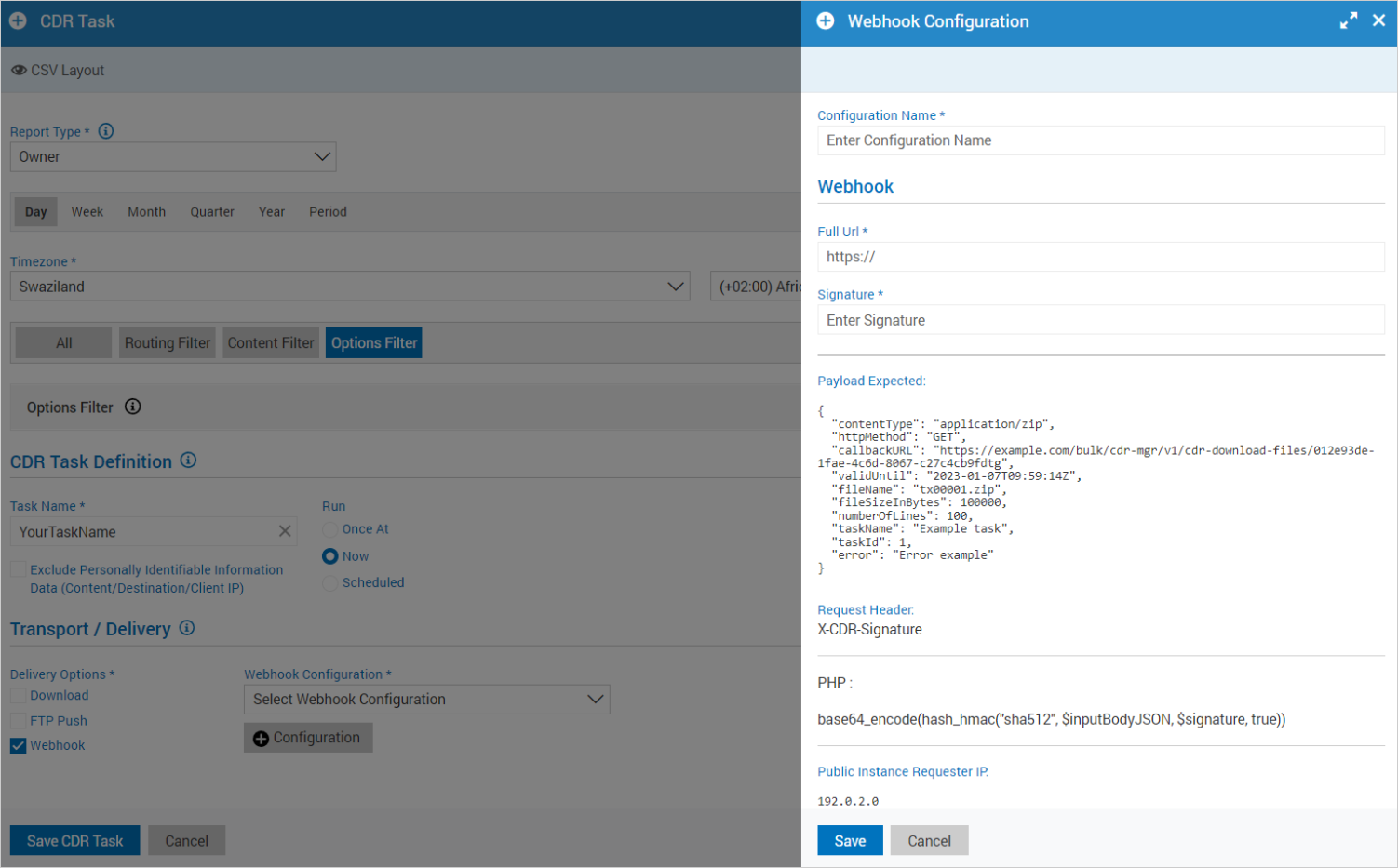
To configure a new webhook, the following data are needed:
Configuration Name - The Webhook configuration name.
Full URL - The Webhook URL to which a POST request will be sent with a payload.
Signature - a random string used for signing and validating requests.
Each request payload is signed with the signature key from a configuration with the SHA-512 algorithm which is base64 encoded. The signature key will be in the request header field [X-CDR-Signature]. The exact function for signing a request is:
return base64_encode(hash_hmac('sha512', $inputBodyJSON, $signature, true));
This way it is possible to check authenticity of the request.
The expected format of a payload that will be sent in the request is presented below:
{
  "contentType": "application/zip",
  "httpMethod": "GET",
  "callbackURL": "https://example.com/bulk/cdr-mgr/v1/cdr-download-files/012e93de-1fae-4c6d-8067-c27c4cb9fdtg",
  "validUntil": "2023-01-10T10:02:27Z",
  "fileName": "tx00001.zip",
  "fileSizeInBytes": 100000,
  "numberOfLines": 100,
  "taskName": "Example task",
  "taskId": 1,
  "error": "Error message"
}
The destination should understand our payloads. From the provided payload, the needed data for pulling the report can be found. The payload contains the callback URL with an access token, where the report is stored. The access token is valid for 24 hours, i.e. until the date and time as listed in a payload.
If any error occurs, the error message as a string will be sent within a payload. Otherwise, the error value will be an empty string.
The IP address of the Platform instance that sends requests will be displayed at the bottom of the window, so it can be whitelisted if needed.
3. Data Model
Data Model defines the structure of a JSON document. It describes the data related to a webhook's payload.
WebhookDescriptionBody object properties:
| Name | Type | Description |
|---|---|---|
| contentType | string | Indicates the media type of the resource to retrieve. The value is 'application/zip'. |
| httpMethod | string | The method to be used for getting the report. The value is 'GET'. |
| callbackURL | string | The callback URL where the report is stored. |
| validUntil | string($date-time) | The date and time (UTC based) until the access token is valid. |
| fileName | string | The report file name. |
| fileSizeInBytes | integer | The report file size in bytes. |
| numberOfLines | integer | The report number of lines. |
| taskName | string | The CDR task name. |
| taskId | integer | The CDR task ID. |
| error | string | Error message. If an error occurs, the error message will be provided; otherwise, it will be an empty string. |
JSON Example
{
  "contentType": "application/zip",
  "httpMethod": "GET",
  "callbackURL": "https://example.com/bulk/cdr-mgr/v1/cdr-download-files/012e93de-1fae-4c6d-8067-c27c4cb9fdtg",
  "validUntil": "2023-01-10T11:20:09Z",
  "fileName": "tx00001.zip",
  "fileSizeInBytes": 100000,
  "numberOfLines": 100,
  "taskName": "Task Name Example",
  "taskId": 1,
  "error": ""
}